TinyMCE AI on-premises
The TinyMCE AI on-premises service is a self-hosted back end that powers AI writing assistance. It can be used with the TinyMCE rich text editor, particularly the TinyMCE AI plugin, or as a standalone service. It runs entirely within the host infrastructure. Document content, conversation history, file attachments, and user data stay within the host network and are not stored by Tiny. Data sent to a configured LLM provider is subject to that provider’s data handling policies.
The service ships as a single Open Container Initiative (OCI) container image (registry.containers.tiny.cloud/ai-service-tiny). It exposes a REST API, a Management Panel, Server-Sent Events streaming, and an OpenAPI spec.
Architecture
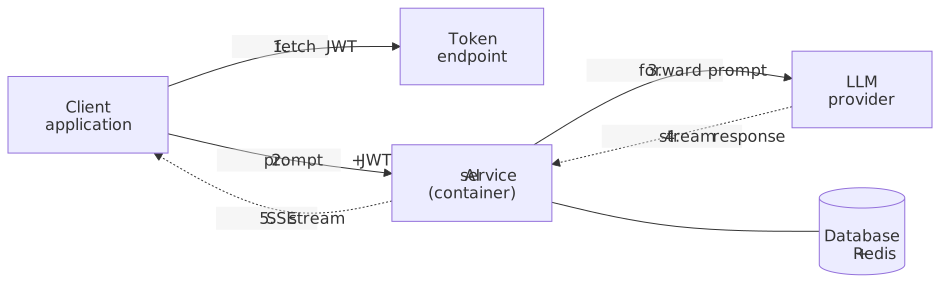
Data flow for a single AI request:
-
The client application requests a JWT from the token endpoint.
-
The client sends a prompt with the JWT to the AI service over HTTPS.
-
The AI service verifies the token, checks per-feature permissions, and forwards the prompt to the configured large language model (LLM).
-
The LLM streams its response back to the AI service.
-
The AI service relays the response to the client through Server-Sent Events (SSE).
When used with TinyMCE tinymceai, the plugin handles steps 1, 2, and 5 automatically through the tinymceai_token_provider callback.
| The browser connects directly to the AI service — requests do not pass through the application back end. The AI service must be network-reachable from the end-user browser, which means it must have a public URL (or be accessible through a VPN/internal network when deployed on an intranet). Configure CORS and TLS on the AI service accordingly. |
The shared secret (API Secret) never leaves the back end; the editor and the AI service only ever see signed tokens.
Capabilities
| Capability | Details |
|---|---|
Conversational AI assistant |
Multi-turn AI chat with support for document and file context. Conversation history is isolated per user through the JWT |
Document review |
Review a document for correctness, clarity, readability, tone, and more, or translate to another language. |
Quick actions |
Rewrite, summarize, expand, change tone, fix grammar, translate, continue, and improve writing. |
LLM provider flexibility |
OpenAI, Anthropic, Google Gemini, Azure OpenAI, AWS Bedrock, Google Vertex AI, or any self-hosted OpenAI-compatible endpoint. Multiple providers can coexist. |
Model Context Protocol (MCP) integration |
Connect internal tools, databases, and knowledge bases through Model Context Protocol over Streamable HTTP transport. |
Web scraping and web search |
Pluggable endpoints for fetching web pages and running searches. |
Multi-tenant environments |
Isolated conversation history and per-tenant access keys through Environments. |
Per-user, per-feature permissions |
Fine-grained control through the |
Streaming responses |
Server-Sent Events from the LLM back to the browser. |
File attachments |
Use additional files as context for AI conversations. Storage options include database, filesystem, Amazon S3, or Azure Blob Storage. |
Observability |
Structured request logs, OpenTelemetry, and Langfuse. All three run as independent simultaneous pipelines. |
Horizontal scaling |
The service is stateless; add replicas behind a load balancer without shared local state. |
OpenAPI specification |
Published at |
Credentials
Three credentials are involved in an on-premises deployment. They are distinct and serve different purposes.
| Credential | Where it lives | What it does | Required? |
|---|---|---|---|
|
AI service container (environment variable) |
Activates the AI service. A long string provided by the Tiny account representative. |
Yes — the service refuses to start without it. |
|
Editor page (CDN script URL) or build configuration |
Authenticates against |
Only when loading TinyMCE from the CDN. Omit for self-hosted editor bundles. |
|
|
Activates premium TinyMCE features when using a self-hosted editor bundle (not the CDN). |
Only for self-hosted editor deployments. Provided by the Tiny account representative. |
LICENSE_KEY (the AI service license) and TINYMCE_API_KEY / license_key (the editor license) are different credentials from different sources. Do not interchange them.
|
Prerequisites
| Requirement | Details |
|---|---|
Container runtime |
Docker 20.10+, Podman 4+, or any OCI-compatible runtime. Kubernetes, AWS ECS, or Azure Container Apps are also supported. |
SQL database |
MySQL 8.0 or PostgreSQL 13+ (16 recommended). |
Redis |
3.2.6+ (7.x recommended). Single node or Cluster mode supported. Sentinel not supported. |
LLM access |
At least one provider. Multiple providers can coexist. |
License key and registry credentials |
Provided by a Tiny account representative. |
Token endpoint |
A back end that signs HS256 JWTs. |
Reverse proxy (recommended) |
The AI service does not terminate Transport Layer Security (TLS). A reverse proxy such as nginx, HAProxy, or a cloud load balancer is recommended for TLS termination in production. |
Choosing a setup path
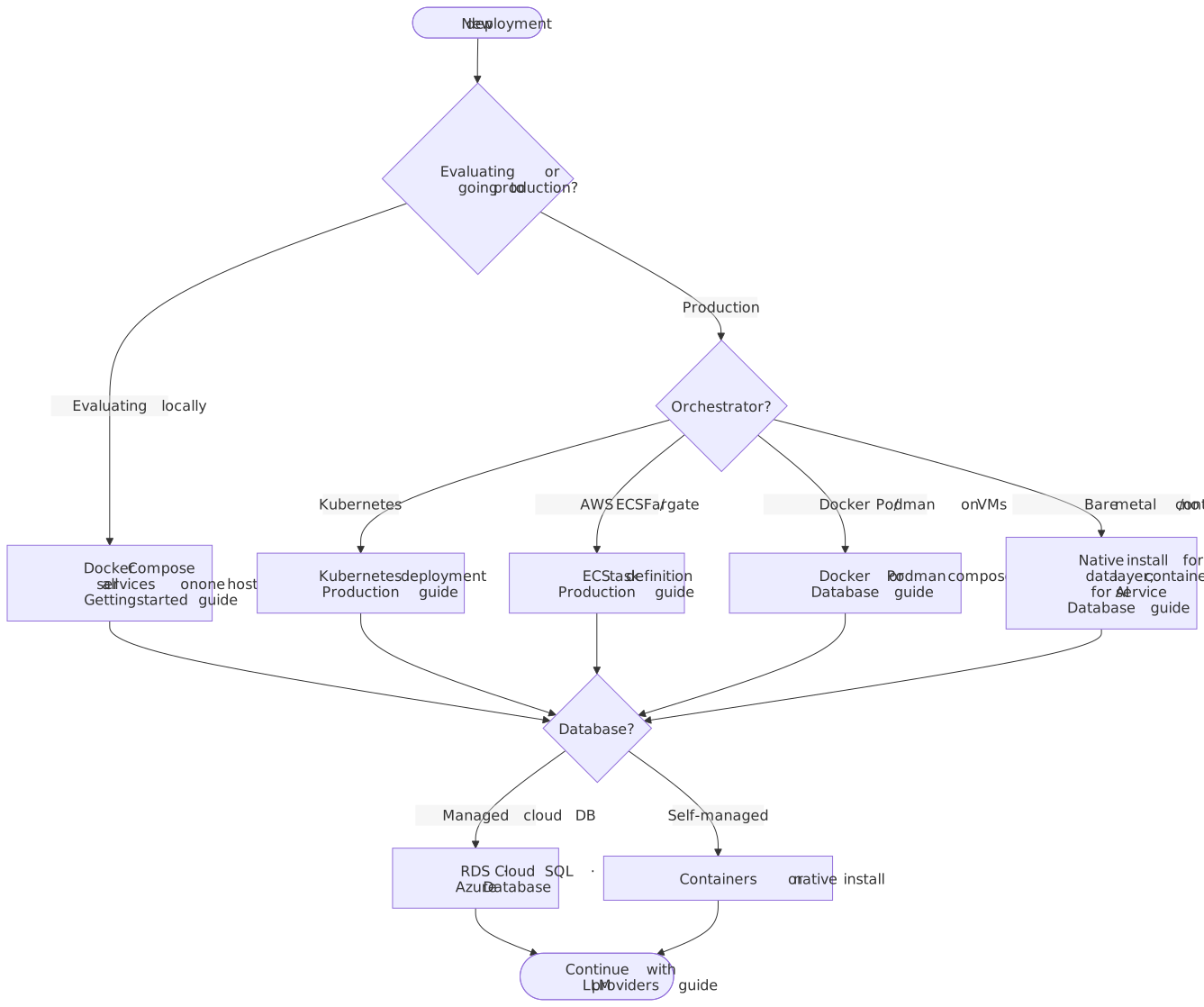
All setup paths lead to the same set of topic guides listed below. The decision tree helps identify which guides to prioritize based on the deployment target.
Topic guides
For a first-time deployment, progress through the guides in order. Each guide can also be used independently as a reference for a specific topic.
| Guide | Scope |
|---|---|
Five-minute Docker Compose quick start. Stand up the AI service, database, Redis, token server, and a browser editor. |
|
Data layer setup: MySQL and PostgreSQL configuration, Redis connectivity, file storage options (S3, Azure Blob, filesystem, database), and host-local database connectivity. |
|
Connect to OpenAI, Anthropic, Google Gemini, Azure OpenAI, AWS Bedrock, Google Vertex AI, or any OpenAI-compatible endpoint (Ollama, vLLM, LM Studio). Custom model catalog and API key rotation. |
|
Model Context Protocol (MCP) tool integration, web scraping endpoints, and web search endpoints. |
|
HS256 signing model, required and optional claims, permissions reference, token endpoint examples in 8 languages, and multi-tenant deployment patterns. |
|
Editor-side configuration: plugin options, token provider, authentication patterns, Cross-Origin Resource Sharing (CORS), and deployment checklists. |
|
Kubernetes manifests, AWS ECS task definitions, horizontal scaling, security hardening, rate limiting, observability, backup and recovery, and upgrades. |
|
Quick triage, container startup failures, JWT errors, LLM provider errors, editor issues, performance, and diagnostic recipes. |
|
Environment variable reference, API endpoint reference, Server-Sent Events reference, and error code reference. |
Support
-
Technical support: Submit a support request (available to customers with an active commercial license).
-
Account and licensing: Contact Tiny.
When submitting a support request, include:
- Container logs
-
docker logs ai-service --tail 200 - Health check
-
curl -fsS http://localhost:8000/healthExpected response:
{"serviceName":"on-premises-http","uptime":1234} - Decoded JWT payload
-
Strip the signature and decode with a JWT library.
- Environment variables
-
Redact secrets before submitting.
docker inspect ai-service | jq '.[0].Config.Env' - Image version
-
docker inspect ai-service | jq '.[0].Config.Image'