TinyMCE AI on-premises: Production deployment guide
This guide assumes a running Kubernetes cluster, ECS cluster, or Docker/Podman host with the relevant CLI tools (kubectl, aws, docker) configured. For cluster setup, refer to the platform documentation.
Production readiness checklist
Before deploying to production, confirm each item:
-
Database and Redis — provisioned, accessible from the AI service, schema created (PostgreSQL).
-
LLM providers —
PROVIDERSconfigured and verified;MODELSdefined for the target provider(s). -
JWT authentication — token endpoint deployed, signing with HS256 and the correct API Secret.
-
TinyMCE integration —
tinymceai_service_urlandtinymceai_token_providerconfigured;ALLOWED_ORIGINSset on the AI service. -
Container image pulled and registry credentials stored as a secret.
-
Reverse proxy with TLS termination and
proxy_buffering offfor SSE. -
Environment and access key created through the Management Panel.
Architecture overview
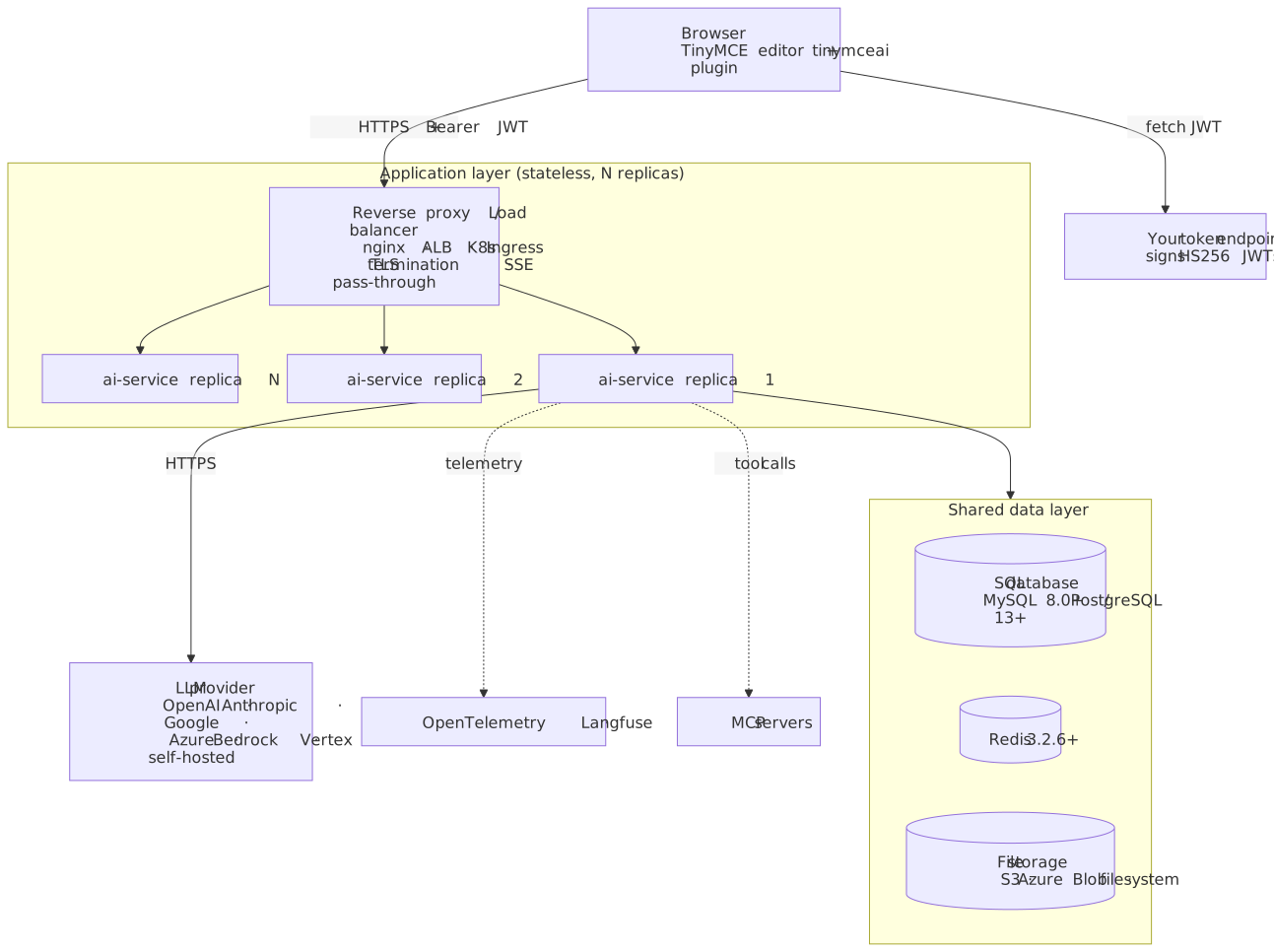
The AI service is stateless, persists all state to MySQL/PostgreSQL and Redis, and scales horizontally behind a load balancer.
TLS / HTTPS
The AI service does not terminate Transport Layer Security (TLS). Place a reverse proxy in front.
Nginx example
server {
    listen 443 ssl;
    server_name ai.example.com;

    ssl_certificate     /etc/ssl/certs/ai.example.com.pem;
    ssl_certificate_key /etc/ssl/private/ai.example.com.key;

    location / {
        proxy_pass http://ai-service:8000;
        proxy_http_version 1.1;
        proxy_set_header Host $host;
        proxy_set_header X-Real-IP $remote_addr;
        proxy_set_header X-Forwarded-For $proxy_add_x_forwarded_for;
        proxy_set_header X-Forwarded-Proto $scheme;

        # SSE streaming support
        proxy_buffering off;
        proxy_cache off;
        proxy_read_timeout 300s;
    }
}|
Server-Sent Events (SSE) streaming requires |
Horizontal scaling
The AI service is stateless. All persistent state lives in the SQL database, Redis, and the file-storage back end. Any number of replicas can run behind a load balancer. All replicas must share identical environment variable configuration. On first boot or after an image upgrade, start a single replica and wait for it to become healthy before scaling up (see Upgrade process).
Scaling considerations
| Component | Scaling approach |
|---|---|
AI service |
Add more containers (stateless) |
MySQL / PostgreSQL |
Read replicas or managed DB (RDS, Cloud SQL, Azure Database) |
Redis |
Redis Cluster or managed Redis with built-in replication (ElastiCache, Memorystore, Azure Cache). Redis Sentinel is not supported. |
File storage |
S3 / Azure Blob recommended for production. The |
|
When deploying for the first time or upgrading to a new version, start a single instance and wait for it to become healthy before scaling up. Subsequent scale events do not require this precaution. |
Podman deployment
This example uses STORAGE_DRIVER='database' for simplicity. For production workloads, use S3 or Azure Blob storage. See File storage for options.
|
The AI service works with Podman as an alternative to Docker. In Podman, containers within a pod share a network namespace, so use 127.0.0.1 instead of container names for hostnames.
podman login -u 'TINY_REGISTRY_USERNAME' registry.containers.tiny.cloud

podman pull registry.containers.tiny.cloud/ai-service-tiny:latest

podman pod create --name ai-pod -p 8000:8000 -p 3306:3306 -p 6379:6379

podman run -d --pod ai-pod --name mysql \
  -e MYSQL_ROOT_PASSWORD=ROOT_PASSWORD \
  -e MYSQL_DATABASE=ai_service \
  mysql:8.0

podman run -d --pod ai-pod --name redis redis:7

podman run --init -d --pod ai-pod --name ai-service \
  -e LICENSE_KEY='T8LK:...' \
  -e ENVIRONMENTS_MANAGEMENT_SECRET_KEY='MANAGEMENT_SECRET' \
  -e DATABASE_DRIVER='mysql' \
  -e DATABASE_HOST='127.0.0.1' \
  -e DATABASE_USER='root' \
  -e DATABASE_PASSWORD='ROOT_PASSWORD' \
  -e DATABASE_DATABASE='ai_service' \
  -e REDIS_HOST='127.0.0.1' \
  -e PROVIDERS='{"openai":{"type":"openai","apiKeys":["sk-proj-..."]}}' \
  -e STORAGE_DRIVER='database' \
  registry.containers.tiny.cloud/ai-service-tiny:latest
Pin to mysql:8.0. The mysql:8 tag floats to the latest MySQL, which removes the default-authentication-plugin flag and causes a crash loop. See Database, Redis, and storage for details.
|
Kubernetes deployment
Namespace and image pull secret
kubectl create namespace tinymce-ai

kubectl create secret docker-registry tiny-registry \
  --namespace tinymce-ai \
  --docker-server=registry.containers.tiny.cloud \
  --docker-username=TINY_REGISTRY_USERNAME \
  --docker-password='TINY_REGISTRY_ACCESS_TOKEN'
Application secrets
apiVersion: v1
kind: Secret
metadata:
  name: ai-service-secrets
  namespace: tinymce-ai
type: Opaque
stringData:
  license-key: "EXAMPLE_LICENSE_KEY"
  management-secret: "EXAMPLE_MANAGEMENT_SECRET"
  db-password: "EXAMPLE_DB_PASSWORD"
  redis-password: "EXAMPLE_REDIS_PASSWORD"
  storage-access-key: "EXAMPLE_S3_ACCESS_KEY_ID"
  storage-secret-key: "EXAMPLE_S3_SECRET_ACCESS_KEY"
  providers: |
    {
      "openai": {
        "type": "openai",
        "apiKeys": ["sk-proj-EXAMPLE_KEY"]
      }
    }
In production, use Sealed Secrets, External Secrets Operator, or HashiCorp Vault rather than committing raw secret manifests. For the Kubernetes Secret resource itself, see the Kubernetes Secrets documentation.
Deployment
Full Kubernetes Deployment manifest
apiVersion: apps/v1
kind: Deployment
metadata:
  name: ai-service
  namespace: tinymce-ai
spec:
  replicas: 2
  selector:
    matchLabels:
      app: ai-service
  template:
    metadata:
      labels:
        app: ai-service
    spec:
      terminationGracePeriodSeconds: 300
      imagePullSecrets:
        - name: tiny-registry
      containers:
        - name: ai-service
          image: registry.containers.tiny.cloud/ai-service-tiny:latest
          ports:
            - containerPort: 8000
          env:
            - name: LICENSE_KEY
              valueFrom:
                secretKeyRef:
                  name: ai-service-secrets
                  key: license-key
            - name: ENVIRONMENTS_MANAGEMENT_SECRET_KEY
              valueFrom:
                secretKeyRef:
                  name: ai-service-secrets
                  key: management-secret
            - name: DATABASE_DRIVER
              value: "mysql"
            - name: DATABASE_HOST
              value: "mysql.tinymce-ai.svc.cluster.local"
            - name: DATABASE_USER
              value: "ai_service"
            - name: DATABASE_PASSWORD
              valueFrom:
                secretKeyRef:
                  name: ai-service-secrets
                  key: db-password
            - name: DATABASE_DATABASE
              value: "ai_service"
            # For PostgreSQL: set to "public" or ensure the cs-on-premises schema exists
            # - name: DATABASE_SCHEMA
            #   value: "public"
            - name: REDIS_HOST
              value: "redis.tinymce-ai.svc.cluster.local"
            - name: REDIS_PASSWORD
              valueFrom:
                secretKeyRef:
                  name: ai-service-secrets
                  key: redis-password
            - name: PROVIDERS
              valueFrom:
                secretKeyRef:
                  name: ai-service-secrets
                  key: providers
            - name: STORAGE_DRIVER
              value: "s3"
            - name: STORAGE_REGION
              value: "us-east-1"
            - name: STORAGE_BUCKET
              value: "example-ai-storage-bucket"
            - name: STORAGE_ACCESS_KEY_ID
              valueFrom:
                secretKeyRef:
                  name: ai-service-secrets
                  key: storage-access-key
            - name: STORAGE_SECRET_ACCESS_KEY
              valueFrom:
                secretKeyRef:
                  name: ai-service-secrets
                  key: storage-secret-key
            - name: ALLOWED_ORIGINS
              value: "https://app.example.com"
            - name: ENABLE_METRIC_LOGS
              value: "true"
          readinessProbe:
            httpGet:
              path: /health
              port: 8000
            initialDelaySeconds: 10
            periodSeconds: 5
          livenessProbe:
            httpGet:
              path: /health
              port: 8000
            initialDelaySeconds: 30
            periodSeconds: 10
          resources:
            requests:
              memory: "512Mi"
              cpu: "500m"
            limits:
              memory: "2Gi"
              cpu: "2000m"
For PostgreSQL, change DATABASE_DRIVER to "postgres", update DATABASE_HOST to the PostgreSQL endpoint, and add DATABASE_SCHEMA set to "public" (or ensure the cs-on-premises schema exists). See PostgreSQL schema prerequisite.
|
terminationGracePeriodSeconds is set to 300 to match the maximum SSE stream duration. On SIGTERM, the service finishes in-flight SSE streams before shutting down. Set this value equal to or greater than the longest expected AI response time. For multi-zone clusters, add topologySpreadConstraints to the pod spec to spread replicas across availability zones. Add a PodDisruptionBudget (minAvailable: 1 or a percentage at scale) to prevent all replicas being evicted simultaneously during node maintenance. These resource values are evaluation defaults; adjust for production workload.
|
Service
apiVersion: v1
kind: Service
metadata:
  name: ai-service
  namespace: tinymce-ai
spec:
  selector:
    app: ai-service
  ports:
    - port: 8000
      targetPort: 8000
Bootstrap the environment
After the first pod reaches Ready status, create an environment and access key through the Management Panel:
-
Access the Management Panel at
https://<ingress-host>/panel/. -
Sign in using the
ENVIRONMENTS_MANAGEMENT_SECRET_KEY. -
Create an environment and note the Environment ID.
-
Create an access key and copy the API Secret immediately (shown only once).
These values are required by the token endpoint. See Getting started — Create an environment and access key for details.
|
Always create environments through the Management Panel UI. Environments created through the raw management API are not fully registered and cause |
Ingress
apiVersion: networking.k8s.io/v1
kind: Ingress
metadata:
  name: ai-service
  namespace: tinymce-ai
  annotations:
    nginx.ingress.kubernetes.io/proxy-buffering: "off"
    nginx.ingress.kubernetes.io/proxy-read-timeout: "300"
    nginx.ingress.kubernetes.io/proxy-send-timeout: "300"
spec:
  tls:
    - hosts:
        - ai.example.com
      secretName: ai-tls-cert
  rules:
    - host: ai.example.com
      http:
        paths:
          - path: /
            pathType: Prefix
            backend:
              service:
                name: ai-service
                port:
                  number: 8000
Horizontal pod autoscaler
apiVersion: autoscaling/v2
kind: HorizontalPodAutoscaler
metadata:
  name: ai-service-hpa
  namespace: tinymce-ai
spec:
  scaleTargetRef:
    apiVersion: apps/v1
    kind: Deployment
    name: ai-service
  minReplicas: 2
  maxReplicas: 20
  metrics:
    - type: Resource
      resource:
        name: cpu
        target:
          type: Utilization
averageUtilization: 70| The AI service is I/O-bound (waiting on LLM provider responses). CPU-based autoscaling is a safe starting point but may not trigger under high concurrency if CPU remains low. For production, consider supplementing with custom metrics (concurrent SSE streams, request queue depth) through KEDA or the Prometheus Adapter. For HPA configuration, see the Kubernetes HPA documentation. |
AWS ECS / Fargate
Task definition
Full ECS Fargate task definition
{
  "family": "ai-service",
  "networkMode": "awsvpc",
  "requiresCompatibilities": ["FARGATE"],
  "cpu": "1024",
  "memory": "2048",
  "containerDefinitions": [
    {
      "name": "ai-service",
      "image": "registry.containers.tiny.cloud/ai-service-tiny:latest",
      "portMappings": [{ "containerPort": 8000 }],
      "healthCheck": {
        "command": ["CMD-SHELL", "wget -q --spider http://localhost:8000/health || exit 1"],
        "interval": 30,
        "timeout": 5,
        "retries": 3,
        "startPeriod": 60
      },
      "secrets": [
        { "name": "LICENSE_KEY", "valueFrom": "arn:aws:secretsmanager:us-east-1:111122223333:secret:ai-license" },
        { "name": "ENVIRONMENTS_MANAGEMENT_SECRET_KEY", "valueFrom": "arn:aws:secretsmanager:us-east-1:111122223333:secret:ai-mgmt-secret" },
        { "name": "DATABASE_PASSWORD", "valueFrom": "arn:aws:secretsmanager:us-east-1:111122223333:secret:ai-db" },
        { "name": "PROVIDERS", "valueFrom": "arn:aws:secretsmanager:us-east-1:111122223333:secret:ai-providers" },
        { "name": "MODELS", "valueFrom": "arn:aws:secretsmanager:us-east-1:111122223333:secret:ai-models" }
      ],
      "environment": [
        { "name": "DATABASE_DRIVER", "value": "mysql" },
        { "name": "DATABASE_HOST", "value": "example-rds-endpoint.region.rds.amazonaws.com" },
        { "name": "DATABASE_USER", "value": "ai_service" },
        { "name": "DATABASE_DATABASE", "value": "ai_service" },
        { "name": "REDIS_HOST", "value": "example-elasticache-endpoint.region.cache.amazonaws.com" },
        { "name": "STORAGE_DRIVER", "value": "s3" },
        { "name": "STORAGE_BUCKET", "value": "example-ai-storage-bucket" },
        { "name": "STORAGE_REGION", "value": "us-east-1" },
        { "name": "ALLOWED_ORIGINS", "value": "https://app.example.com" },
        { "name": "ENABLE_METRIC_LOGS", "value": "true" }
      ]
    }
  ]
}
The AI service does not use ECS task role credentials for S3 access. Add STORAGE_ACCESS_KEY_ID and STORAGE_SECRET_ACCESS_KEY as secrets entries from AWS Secrets Manager.
|
|
The AI service does not use platform-native credential chains. AWS IRSA, EC2 instance profiles, GCP Workload Identity, and Azure Managed Identity are all ignored. All provider credentials (LLM keys, S3 access keys, Vertex service accounts) must be supplied explicitly as environment variables. This is a known limitation that applies across all deployment targets. |
Infrastructure recommendations
| Service | AWS recommendation |
|---|---|
Database |
RDS for MySQL 8.0 (Multi-AZ for high availability (HA)) |
Redis |
ElastiCache for Redis 7 (cluster-mode-disabled with Multi-AZ replication, or cluster-mode-enabled with |
Storage |
Same-region S3 bucket |
Load balancer |
ALB with |
Secrets |
AWS Secrets Manager |
Registry pull credentials |
Secrets Manager + ECR pull-through cache, or a private repository mirroring |
Security hardening
| Practice | Implementation |
|---|---|
Network isolation |
Place the AI service in a private subnet; expose only through a load balancer. Restrict database and Redis to the AI service security group. |
Block panel from the public internet |
Restrict |
TLS everywhere |
Terminate TLS 1.3 at the reverse proxy. Use internal mutual TLS (mTLS) between the AI service and the data layer where supported. |
Secrets management |
Use Vault, AWS Secrets Manager, Azure Key Vault, or GCP Secret Manager. Never store secrets directly in orchestration manifests or commit them to source control. |
Database encryption at rest |
Turn on encryption at rest in the cloud provider console. RDS, Cloud SQL, and Azure Database enable this by default. |
Redis authentication |
Always set |
Container security |
Run as non-root, use a read-only filesystem where possible, and drop unnecessary Linux capabilities. |
Image scanning |
Scan |
Least-privilege JSON Web Tokens (JWTs) |
Grant only the permissions each user role requires. Avoid full-access tokens in production. |
API secret rotation |
Periodically create a new access key, add the new key to the configuration, then revoke the old key. The token endpoint reads the secret at request time. |
Audit logging |
Enable |
Large language model (LLM) API key rotation |
Add the new key to the |
| The secrets management, encryption, and observability recommendations above apply across all cloud providers including Azure (AKS, Azure Database, Azure Cache) and GCP (GKE, Cloud SQL, Memorystore). |
Rate limiting
The AI service has no built-in rate limiting. Place rate-limit rules (keyed on the Authorization header or the JWT sub claim) in front of the service using the reverse proxy, WAF, or CDN. For per-tenant rate limiting, key on the aud claim by parsing it in the reverse proxy, or gate token issuance per tenant per minute at the token endpoint. Refer to the platform documentation for implementation details (nginx limit_req_zone, AWS WAF rate-based rules, Cloudflare Rate Limiting).
Observability
Health monitoring
Poll /health on each instance to confirm it is running. A healthy instance responds with HTTP 200.
curl -f http://ai-service:8000/healthStructured metric logs
Set the ENABLE_METRIC_LOGS environment variable to enable request-level JSON logs to stdout:
-e ENABLE_METRIC_LOGS='true'When enabled, the service writes a structured JSON entry for each request. Key fields include the request duration and HTTP status code. These entries are suitable for ingestion into any log aggregator that supports JSON parsing.
{"timestamp":"2026-05-19T10:30:00.123Z","method":"POST","path":"/v1/conversations/abc123/messages","statusCode":200,"durationMs":3421}
Inspect the first few entries with docker logs ai-service --tail 5 | jq . to discover all available fields for the current service version.
|
OpenTelemetry
-e LLM_TELEMETRY_ENABLED='true' \
-e OTEL_EXPORTER_OTLP_TRACES_ENDPOINT='http://otel-collector:4318/v1/traces' \
-e OTEL_TRACES_SAMPLER_ARG='1.0' \
-e OTEL_DEBUG='true'| Variable | Required | Default | Description |
|---|---|---|---|
|
Yes |
|
Primary telemetry switch |
|
Yes |
- |
OpenTelemetry Protocol (OTLP) endpoint URL |
|
No |
|
Sampling rate (0.0 to 1.0) |
|
No |
- |
Verbose OTLP diagnostic logging |
Compatible with Jaeger, Grafana Tempo, Datadog, New Relic, Honeycomb, and any OTLP-compatible back end.
Langfuse
Langfuse provides AI-specific observability: token usage, latency per LLM call, prompt quality scores, and cost tracking.
-e LANGFUSE_PUBLIC_KEY='pk-lf-...' \
-e LANGFUSE_SECRET_KEY='sk-lf-...' \
-e LANGFUSE_BASE_URL='https://cloud.langfuse.com' \
-e LANGFUSE_DEBUG='true'| Variable | Required | Default | Description |
|---|---|---|---|
|
Yes (if used) |
- |
Langfuse public key |
|
Yes (if used) |
- |
Langfuse secret key |
|
No |
Self-hosted Langfuse URL |
|
|
No |
- |
Verbose Langfuse logging |
Langfuse also requires LLM_TELEMETRY_ENABLED=true. If the service version uses the OTLP pipeline for Langfuse export, a valid OTEL_EXPORTER_OTLP_TRACES_ENDPOINT is also required; check the release notes for the deployed version.
OpenTelemetry and Langfuse can run at the same time. The service emits to both without conflict.
Distributed logging
For production multi-instance deployments, ship container logs to the existing log aggregator. The metric logs produced by the ENABLE_METRIC_LOGS option are already structured JSON and parse cleanly in any pipeline. Refer to the platform documentation for the appropriate log driver or DaemonSet configuration (CloudWatch, Fluent Bit, Promtail, Filebeat, or the Docker fluentd log driver).
Recommended monitoring
The following checks help catch common issues early:
-
Health endpoint — poll
/healthon each instance; alert if any instance returns a non-200 response for more than 60 seconds. -
Error rate — monitor the HTTP 5xx rate in the metric logs or traces; a sustained increase may indicate an LLM provider outage or a misconfigured environment.
-
Latency — track request duration; a sudden increase typically points to LLM provider throttling or network issues.
-
Container restarts — alert on repeated container restarts, which may indicate a missing environment variable or a database connectivity problem.
For troubleshooting specific error patterns, see Troubleshooting.
Backup and recovery
Database
The database contains environments, access keys, conversations, messages, and file metadata. Back up the database using standard production practices:
-
MySQL:
mysqldumpor managed snapshots (RDS automated backups). -
PostgreSQL:
pg_dumpor managed snapshots.
Enable point-in-time recovery.
Upgrade process
-
Pull the new image:
docker pull registry.containers.tiny.cloud/ai-service-tiny:NEW_VERSION -
For rolling deploys across version boundaries: start one instance at the new version and wait for it to become healthy before rolling the rest.
-
For Kubernetes: update the image tag in the Deployment. Set
strategy.rollingUpdate.maxSurge: 1andmaxUnavailable: 0to ensure at least one old pod remains available during migrations. The defaultRollingUpdatestrategy handles zero-downtime upgrades, provided the first new pod becomes Ready before the rollout continues. -
Verify
/healthon every replica before declaring the upgrade complete.
Review the release notes for the target version and take a database backup before upgrading.
License keys are per-deployment, not per-replica. One key covers any number of replicas of a single deployment.