TinyMCE AI on-premises: editor-side integration
This page covers the editor-side configuration that connects TinyMCE to the on-premises AI service. It assumes:
-
The AI service is already running. See Getting started for setup instructions.
-
A token endpoint exists that signs JSON Web Tokens (JWTs) for the AI service. See JWT authentication for back-end implementations.
-
A valid TinyMCE license key or API key with the AI feature enabled. On-premises deployments typically use a license key provided by a Tiny account representative.
For general framework setup (installing wrappers, component structure, server-side rendering (SSR) patterns), see the existing integration guides:
The on-premises AI integration adds the options documented below to the standard TinyMCE init configuration.
Token flow
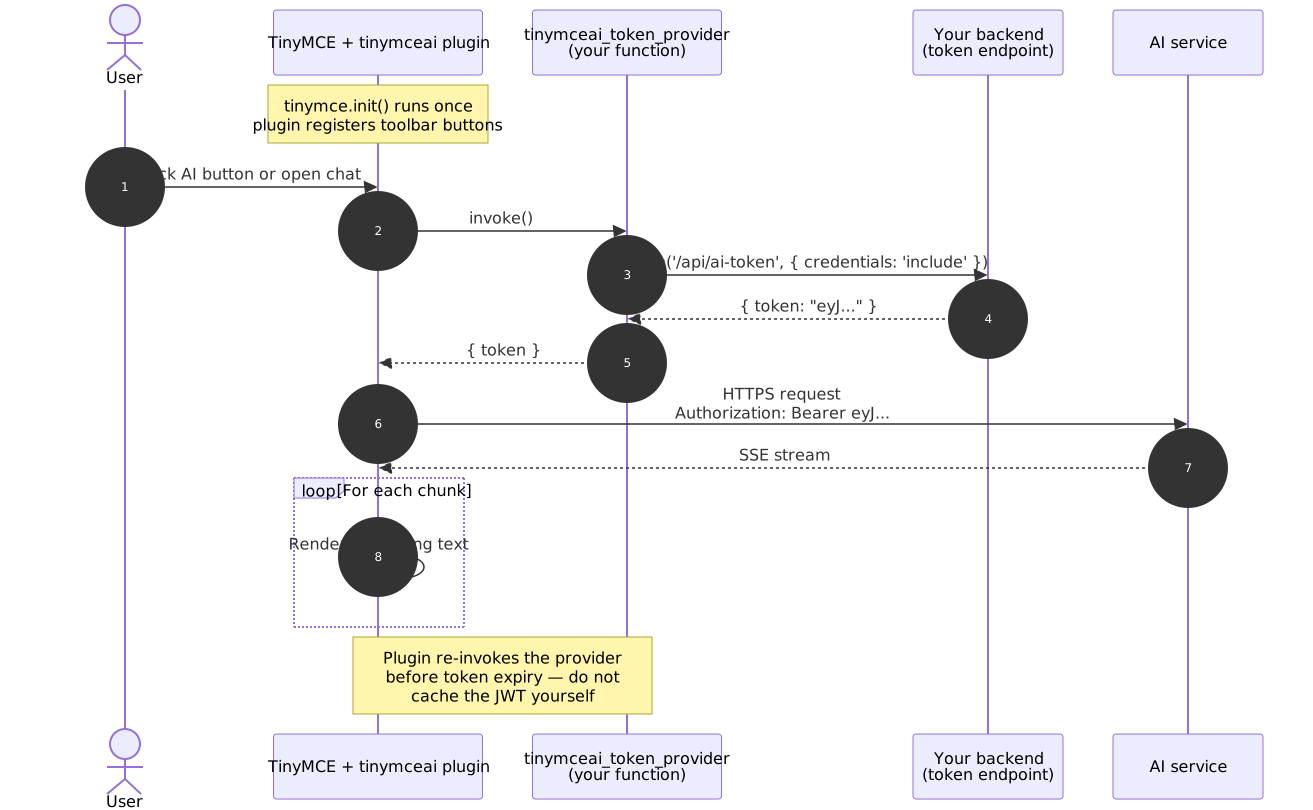
The plugin calls the token provider on initialization and again before the cached token expires. The application back end authenticates the browser request through its own session layer, signs an HS256 JWT with the API Secret, and returns it. The plugin then sends the JWT to the AI service with every request.
Required editor options
| Option | Description |
|---|---|
|
|
|
Include one or more of |
|
The origin of the AI service (no trailing slash, no path), for example |
|
A function returning |
Minimal example
The following vanilla JavaScript example contains every on-premises-specific option. The same init options apply identically inside the React, Vue, Angular, and Svelte wrapper components.
<!DOCTYPE html>
<html>
<head>
  <script src="/path/to/tinymce/tinymce.min.js" referrerpolicy="origin"></script>
</head>
<body>
  <textarea id="editor"><p>Hello world.</p></textarea>
  <script>
    tinymce.init({
      selector: '#editor',
      license_key: 'T8LK:...',
      plugins: 'tinymceai',
      toolbar: 'undo redo | bold italic | tinymceai-chat tinymceai-review tinymceai-quickactions',
      height: 500,
      tinymceai_service_url: 'https://ai.yourcompany.com',
      tinymceai_token_provider: () => {
        return fetch('/api/ai-token', {
          method: 'POST',
          credentials: 'include'
        })
          .then((r) => r.json())
          .then((data) => ({ token: data.token }));
      }
    });
  </script>
</body>
</html>
Replace /path/to/tinymce/ with the location of the self-hosted TinyMCE assets. See Self-hosted installation for download and setup instructions.
tinymceai_token_provider
A function that returns a Promise resolving to an object with a token property containing the JWT string.
{ token: 'eyJhbGciOiJIUzI1NiIs...' }tinymceai_token_provider: () => {
return fetch('/api/ai-token', { method: 'POST' })
.then((r) => r.json())
.then((data) => ({ token: data.token }));
}| Behavior | Detail |
|---|---|
Automatic refresh |
The plugin calls the provider on initialization and again when the cached token nears expiry (60-second safety margin). Do not cache the JWT inside the provider. |
Error handling |
If the function rejects or the endpoint returns a non-OK response, the plugin surfaces an error in the editor UI. |
Token lifetime |
Tokens should be short-lived (5-15 minutes recommended). See JWT authentication for signing key, payload structure, and lifetime guidance. |
Framework-specific examples
The examples below show the minimum configuration needed to connect the TinyMCE AI plugin to the on-premises service. Each uses the framework wrapper’s init prop to pass the same options documented above.
React
import { Editor } from '@tinymce/tinymce-react';

function MyEditor() {
  return (
    <Editor
      licenseKey="T8LK:..."
      init={{
        plugins: 'tinymceai',
        toolbar: 'undo redo | bold italic | tinymceai-chat tinymceai-review tinymceai-quickactions',
        height: 500,
        tinymceai_service_url: 'https://ai.yourcompany.com',
        tinymceai_token_provider: () =>
          fetch('/api/ai-token', { method: 'POST', credentials: 'include' })
            .then((r) => r.json())
            .then((data) => ({ token: data.token }))
      }}
    />
  );
}
Vue.js
<template>
  <Editor
    license-key="T8LK:..."
    :init="editorInit"
  />
</template>

<script setup>
import Editor from '@tinymce/tinymce-vue';

const editorInit = {
  plugins: 'tinymceai',
  toolbar: 'undo redo | bold italic | tinymceai-chat tinymceai-review tinymceai-quickactions',
  height: 500,
  tinymceai_service_url: 'https://ai.yourcompany.com',
  tinymceai_token_provider: () =>
    fetch('/api/ai-token', { method: 'POST', credentials: 'include' })
      .then((r) => r.json())
      .then((data) => ({ token: data.token }))
};
</script>
Angular
<!-- app.component.html -->
<editor
  [licenseKey]="'T8LK:...'"
  [init]="editorInit"
></editor>
// app.component.ts
import { Component } from '@angular/core';
@Component({ selector: 'app-root', templateUrl: './app.component.html' })
export class AppComponent {
editorInit = {
plugins: 'tinymceai',
toolbar: 'undo redo | bold italic | tinymceai-chat tinymceai-review tinymceai-quickactions',
height: 500,
tinymceai_service_url: 'https://ai.yourcompany.com',
tinymceai_token_provider: () =>
fetch('/api/ai-token', { method: 'POST', credentials: 'include' })
.then((r: Response) => r.json())
.then((data: { token: string }) => ({ token: data.token }))
};
}For general framework setup (installing wrappers, SSR configuration, bundler setup), refer to the framework integration guides linked at the top of this page. Replace T8LK:… with the license key from the Tiny account representative.
Authenticating the token request
The tinymceai_token_provider fetches a JWT from the application back end. How that back end authenticates the browser request depends on the application architecture.
Session cookie
If the page and the token endpoint share an origin (or a parent domain), the browser sends session cookies automatically:
fetch('/api/ai-token', { method: 'POST', credentials: 'include' })For cross-origin token endpoints, the back end must respond with Access-Control-Allow-Origin: <editor-origin> (not *) and Access-Control-Allow-Credentials: true, and the session cookie must be set with SameSite=None; Secure.
Bearer header
If the application already holds a session JWT (injected at render time, or from an auth library), forward it as a header:
fetch('/api/ai-token', {
  method: 'POST',
  headers: { 'Authorization': `Bearer ${sessionJwt}` }
})
This pattern avoids cookies entirely and works well for cross-origin setups.
Cross-origin requests to the AI service
In production the editor page and the AI service typically run on different origins (https://app.yourcompany.com and https://ai.yourcompany.com). The AI service must respond with CORS headers that permit the editor origin; otherwise the browser blocks every request.
Configuring ALLOWED_ORIGINS
Set the ALLOWED_ORIGINS environment variable on the AI service container to a comma-separated list of permitted editor origins (scheme + host + port):
-e ALLOWED_ORIGINS='https://app.yourcompany.com,https://staging.yourcompany.com'| Behavior | Detail |
|---|---|
Format |
Comma-separated origins. Each entry must include the scheme ( |
Default when unset |
The service rejects cross-origin requests (no |
Wildcard |
|
Preflight (OPTIONS) |
The service handles |
Credentials |
The service responds with |
Verifying CORS
curl -i -X OPTIONS https://ai.yourcompany.com/v1/conversations \
  -H 'Origin: https://app.yourcompany.com' \
  -H 'Access-Control-Request-Method: POST' \
  -H 'Access-Control-Request-Headers: authorization,content-type'
The response should include Access-Control-Allow-Origin: https://app.yourcompany.com. If it shows * or no CORS header, update ALLOWED_ORIGINS on the AI service container and restart.
Common CORS mistakes
| Mistake | Fix |
|---|---|
Trailing slash in origin ( |
Remove the trailing slash. |
Missing port for non-standard ports ( |
Include the port in |
|
All cross-origin requests fail silently. Add the editor origin. |
Reverse proxy stripping |
Configure the proxy to pass the |
Content Security Policy (CSP)
If the application sets a Content-Security-Policy header, allow the AI service origin in connect-src:
Content-Security-Policy:
  connect-src 'self' https://ai.yourcompany.com;
  script-src 'self';
If using the Tiny CDN instead of self-hosted assets, also add https://cdn.tiny.cloud to script-src.
Common integration errors
| Symptom | Likely cause | Fix |
|---|---|---|
Editor loads but no AI buttons appear |
|
Add |
|
The token endpoint rejects the fetch |
Confirm the fetch sends the session cookie ( |
AI responses hang then time out |
Reverse proxy is buffering Server-Sent Events (SSE) |
Disable proxy buffering. See Production deployment. |
Browser console shows a CORS error on |
|
Update |
|
Token endpoint returns invalid JSON or non-200 |
Validate: |
For other issues, see Troubleshooting.